Features
Don’t read about it — use it. Every major view below runs live in your browser, faithful to the app down to the pixel.
Jump to: The Clock Bar · The 24-Hour Compare Grid · The World Map · The 3D Globe
The Clock Bar
A live, pixel-faithful replica of the actual bar cycling all 10 theme palettes — same tile anatomy, same analog faces, same strings, showing the app’s five default cities. Your own cities are what the app is for.
AppBar docking
Registers as a native Win32 AppBar so Windows reserves desktop space. The bar is always visible at your chosen screen edge without covering your applications.
Configurable cities
Add any of 167,603 cities from the GeoNames database. Population-ranked search finds cities instantly by name, country, or region.
City time tiles
Each tile shows the city name, local time (12 or 24-hour), date, flag, and the offset from your own time — "+9 HRS (JST)". Tiles wrap into up to 3 rows.
Analog clocks
Optional analog clock face per tile — faces and hands switch between day and night colours per theme.
10 built-in themes
Default, Midnight, LCARS, Arctic, Evergreen, Sunset, Monochrome, Cyberpunk, Copper, and Ocean Deep.
Local time display
Your local time is always shown alongside the city tiles for quick reference.
The 24-Hour Compare Grid
Every hour of the day, for every city, side by side — with the day of week under each hour so a date rolling past midnight is never a surprise. This grid is computed live in your browser with the same hour math as the app.
Side-by-side hour comparison
See every hour of the day across all your cities simultaneously. Instantly spot overlapping work hours.
Day/night shading
Sun and moon glyphs plus shading show daytime and nighttime hours for each city.
Day-of-week under every hour
Each hour block carries its weekday, so you can see exactly when a city crosses into tomorrow.
Date navigation
Navigate forward and backward through dates to plan future meetings.
"Now" highlight
The current hour column is outlined across all rows so you can instantly see what time it is everywhere.
The World Map
Two real things, no mock-ups: below is a screenshot of the NASA Blue Marble view taken from the running app, and under it the Flat Map view rendered live in your browser — identical timezone bands, night shading, legend, and live city cards, with the default cities.
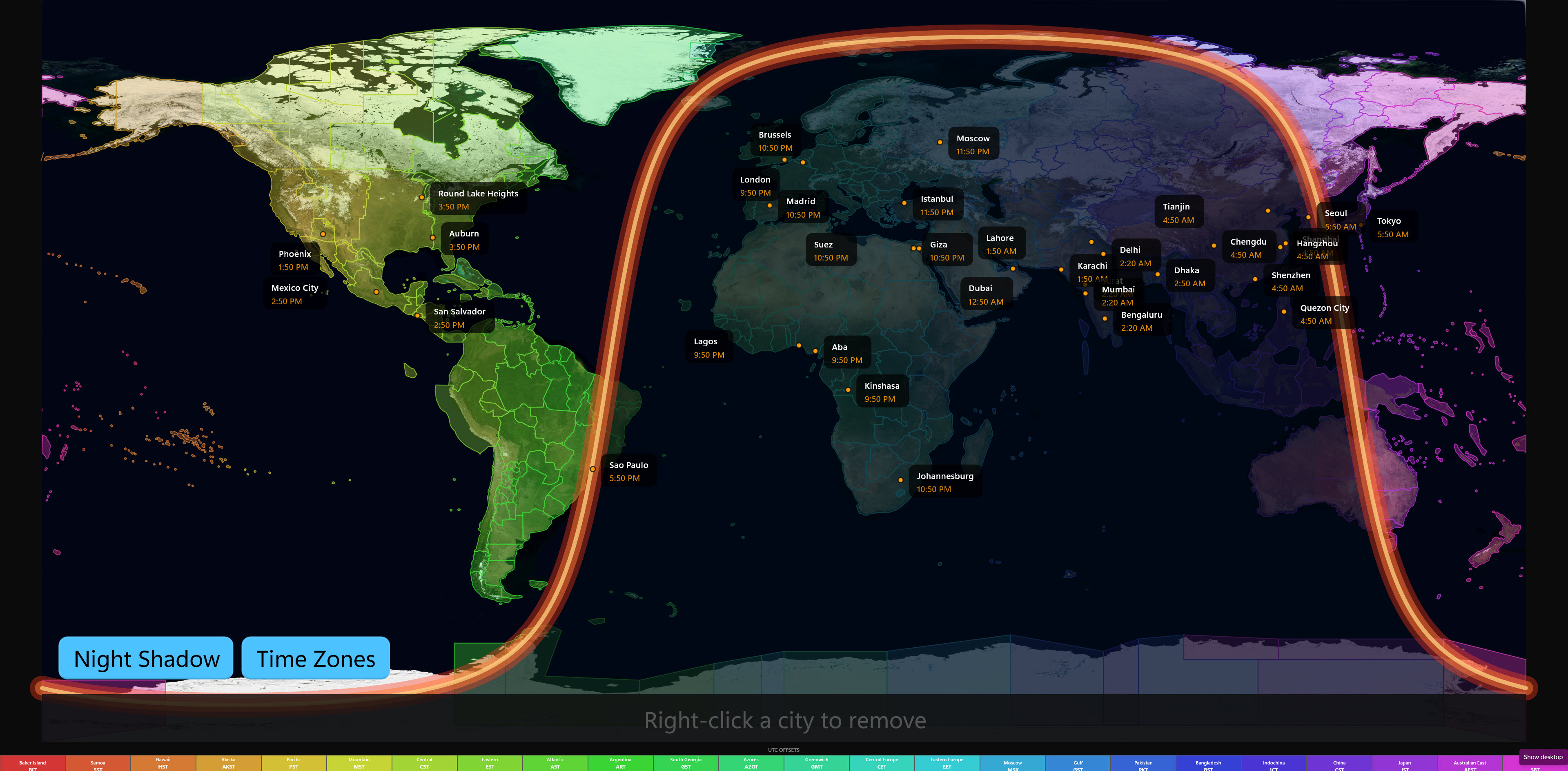
NASA Blue Marble imagery
NASA satellite composite rendered as the map background, with country outlines and a live sun position.
Day/night terminator
The glowing terminator arc is computed in real time by the app’s solar engine — daylight, night, and the twilight band, always current.
Timezone overlay + legend
Color-coded timezone bands over the map, linked to the UTC-offsets legend strip — hover either side and the other lights up.
City cards
Pinned cities appear at their true coordinates with live cards: flag, city and region, local time, and UTC offset.
The 3D Globe
Drag it. This is not a recreation — it is the globe exactly as the app shows it, live in your browser with the five default cities: the same starfield, night shading, and timezone bands. In the app: the full offline world atlas, deeper zoom, and your own cities pinned.
Interactive 3D globe
Spin the Earth freely — timezone bands, day/night hemisphere, and your cities, live.
Real Sun and Moon
Positioned from actual ephemeris calculations, with a 15,458-star catalogued starfield.
Works offline
All globe map data ships inside the app — no internet connection required.
Multi-Monitor
Independent bars per monitor
Run a separate clock bar on each connected display, each with its own city list.
One look everywhere
Theme and dock edge stay in sync across every bar, so all your displays read as one instrument.
Stable monitor IDs
Monitor identity is tracked by Win32 device name, so your layout persists across reboots and display changes.
System
Windows 10/11 native
Built with WinUI 3 and the Windows App SDK. Feels like a native Windows application.
29 languages
Fully localized interface with live language switching and right-to-left support.
Keyboard shortcuts
Summon bars, switch map views, open the compare grid, and toggle overlays from the keyboard.
Backup and restore
Save your entire configuration to a file and restore it on any machine.
Completely offline
No account, no tracking, no network connections. One-time purchase through the Microsoft Store.